The Real-Time Laue Camera — Rapidly orient and characterize single crystals in a matter of seconds!
Highlights
- Ideal replacement for the Polaroid XR-7 back-reflection cassette (film no longer available)
- Northstar 7 software indexes Laue images from cubic, hexagonal, ...triclinic crystal systems and generates stereographic projections
- Provides an accuracy of 0.25° in standard mode and 0.05° in high-resolution mode
- Applications include: silicon, gallium arsenide, high-Tc superconductors, sapphire, geological minerals, turbine blades, etc. and detecting grain boundaries
- Ideal for industrial process control, research applications, or academic laboratories
- Earlier model MWL110 systems can be upgraded to 120 capability
Video Demonstrations
Tell me more about the MWL120 System
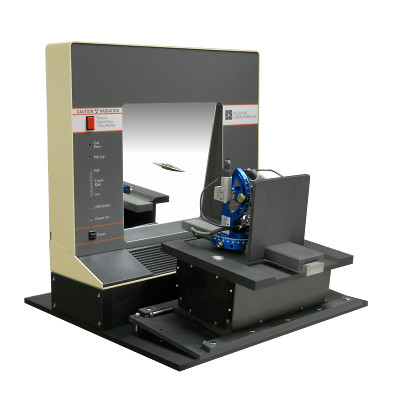
The MWL120 allows an operator to orient single crystals quickly and easily. Manipulate the orientation of a crystal sample using our joystick-controlled motorized stages and see the diffraction pattern move in real time on a computer monitor to rapidly characterize or determine the orientation of the crystal's lattice planes.
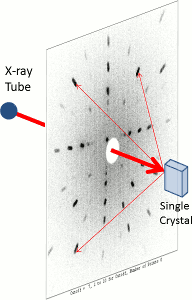
The MWL120 system uses the back-reflection Laue method. The Laue camera interfaces with an X-ray tower and collimates the beam through the center of the camera toward the crystal sample. These X-rays then reflect off the sample back to the detector where the diffraction pattern is collected. This information is piped to a computer running NorthStar 7 — the latest version of our powerful orientation software — and is displayed in real time.
More on NorthStar 7
NorthStar doesn't just display real-time diffraction patterns. It can also collect images with increased exposure-time, find the Laue spots, and then index most of these images automatically once suitable imaging conditions are established. The 'Find Extra Planes' feature even shows the computed plane position oriented behind the collimator which you can't otherwise see when perfectly oriented!
NorthStar 7 is the culmination of years of development work and is a great improvement over other available Laue software, especially in the area of ease of use.
NorthStar 7 ...
- Accommodates small variations in the film-to-specimen distance
- Controls the percentage of Laue spots to be indexed (troublesome points can be ignored, if needed)
- Tries multiple combinations of starting Laue points and selects the best orientation matrix automatically
- Features "shortcut icons" for faster manual work and a "macro" facility for one-touch analysis of crystal orientation. Once set with the right conditions, novice users can achieve expert results quickly with very little effort.
How has the MWL120 improved from the older MWL110 system?
- The NIM bin and all NIM electronics neccessary to the MWL110 system have been miniaturized and built directly into the MWL120 detector housing.
- 1 NIM bin
- 8 electronic NIM modules (including an oil-filled gas bubbler)
- 20+ signal cables
- Detector installation is much simpler with the MWL120 system — just connect a cable from the 12 volt DC laptop-style power supply, one polyflow tube from the gas regulator, and a USB cable from the computer.
- A Field Programmable Gate Array (FPGA) has been designed into the detector. Preamplifier signals are immediately digitized, and from there on, all x-ray signal processing is digital, yielding higher-quality Laue images.
- NorthStar 7 supports 512 x 512 as well as the standard 256 x 256 pixel image formats
- Real-time x-ray data, MEMS gas flow sensor readings, ratemeter information, control of the detector HV etc. take place over a single USB2.0 connection to a Windows 7 PC.
- If you need assistance, you can grant per-instance permission for MWL personnel to share control of your computer over the internet. This way, we can quickly access NorthStar and your detector's diagnostic tools.
Example Images
Collected and Real-Time Laue Images
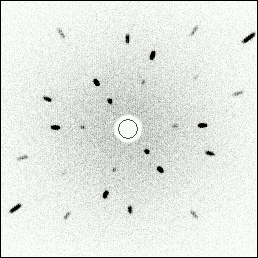 |
| Collected Laue Image of a Silicon Crystal in 110 Orientation |
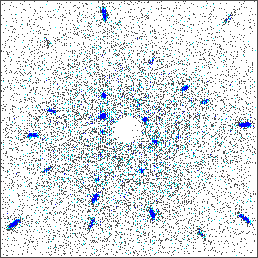 |
Gallium Arsenide Real-Time Image
in Arbitrary Orientation |
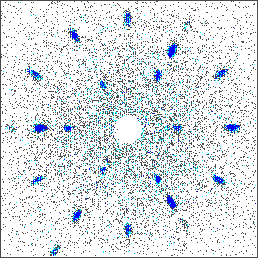 |
| Germanium Real-Time Image Showing 3-fold Symmetry — or 111 Orientation |
Stereographic Projection
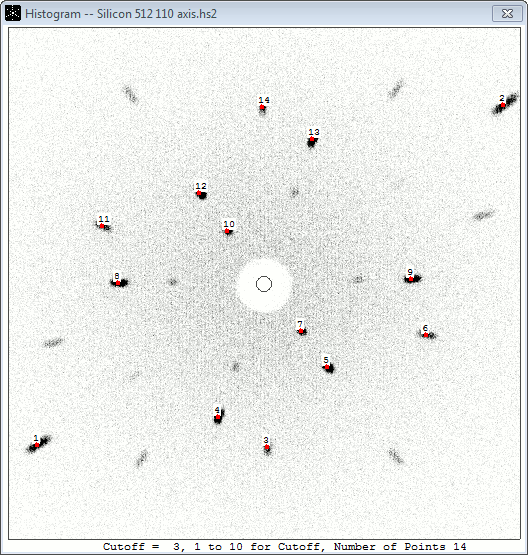 |
| NorthStar has Autodetected 14 Laue Spots in this Silicon 110 Image |
| The autodetection thresholds can be adjusted to find fainter spots, but a selection of 14 points is more than enough to index this image |
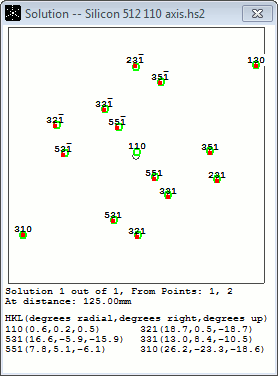 |
| The Points Have Been Indexed |
| In other words, Miller indices have been calculated for the selected Laue points from an orientation matrix. Because the 'Find Extra Planes' feature was enabled, NorthStar was able to generate information for the 110 plane at the center of the image. This plane is 0.6° offset from the center — 0.2° right and 0.5° up |
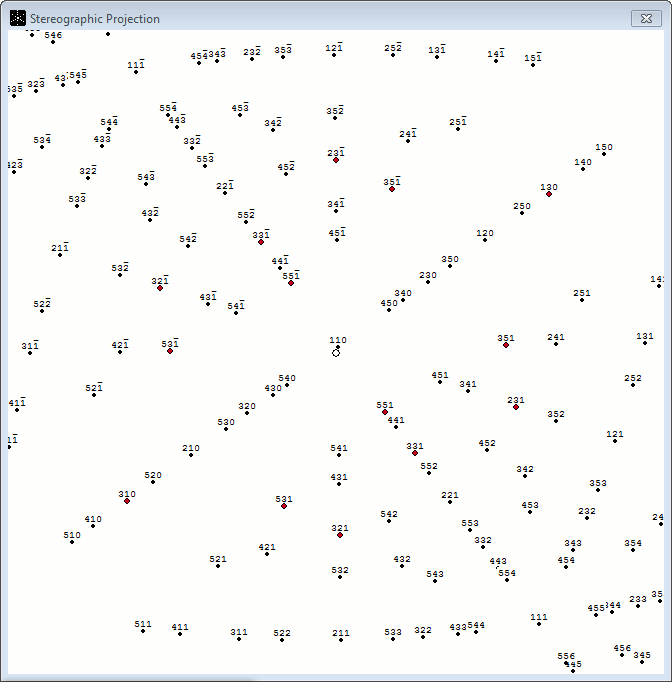 |
| A Stereographic Projection has been Generated |
| The hkℓ solution has been projected onto a plane, and the previously selected Laue spots are drawn in red on the projection. In NorthStar, clicking any point will rotate the orientation matrix and center the projection on that point |
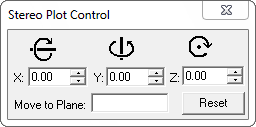 |
| The Stero Plot Control |
| These tools allow the operator to manually rotate the orientation matrix behind the stereographic projection as an alternative to clicking a spot. Once the crystal sample has been virtually oriented using either method, the angles in the X, Y, and Z fields will inform the operator how to physically rotate the crystal sample. Click here for a more detailed example |
Lead-time for an MWL120 system can vary from 30 to 90 days.
Contact us for pricing.
 2023 Multiwire Laboratories, Ltd., 95 Brown Rd MS-1018, 266A Langmuir Bldg., Ithaca NY 14850, USA